What Caused Your Dead Pixel?
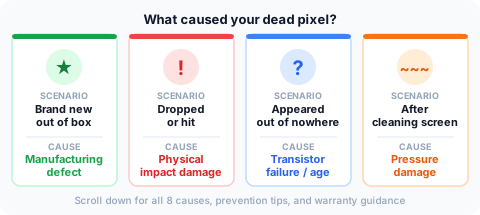
Find your scenario above, then jump to the matching section below. The cause matters — it determines whether you have a warranty claim, whether a fix is possible, and how to prevent it happening again.
1. Manufacturing Defects
Most common cause — especially on brand-new displays.
LCD and OLED panels are built by depositing microscopic thin-film transistors (TFTs) onto glass under cleanroom conditions. Even in the best facilities, a tiny fraction of transistors come out defective. These may fail immediately or fail within the first weeks of use.
This is why ISO 13406-2 Class II — the standard applied to most consumer monitors — permits up to 2 always-dark and 2 always-bright pixel defects. A small defect rate is accepted industry-wide. Premium brands advertising zero dead pixel guarantees pay for more rigorous factory testing, reflected in their higher price.
If your display arrived with a dead pixel: test thoroughly within the retailer's return window. This is your strongest position for a no-questions replacement.
2. Physical Impact and Pressure Damage
Second most common — and the only cause you can usually trace to a specific event.
Dropping a device, pressing hard on a screen during cleaning, or an impact during shipping can damage the TFT layer, liquid crystal alignment, or polarizer — killing individual pixels or clusters near the impact point.
Impact-caused dead pixels often appear in clusters or radiate outward from a visible crack. If a dead pixel appeared shortly after a drop or knock, physical damage is almost certainly responsible — and typically voids warranty coverage for that defect.
3. Electrostatic Discharge (ESD)
Uncommon in daily use — primary risk during DIY screen repairs.
The same static discharge you feel touching a doorknob can destroy transistors if it reaches the panel. Manufacturing facilities take extensive ESD precautions because display panels are highly vulnerable. Consumer ESD damage mainly occurs during screen replacements performed without anti-static grounding tools — not from normal everyday use.
4. Heat Damage
Risk factor for displays near heat sources or operated in hot environments.
Sustained heat degrades thin-film transistor materials over time. Displays left in hot cars, placed near heating vents, or used above their rated temperature accumulate damage that leads to pixel failure.
OLED displays are especially sensitive — each sub-pixel is an organic light emitter, and organic compounds degrade faster at elevated temperatures. Normal home environments are fine; sustained heat exposure is the risk to avoid.
5. Age and Natural Transistor Wear
The expected end-of-life cause — rarely affects displays under 5 years old at normal usage.
Every transistor has a finite lifespan. Under typical conditions, consumer monitor TFTs are rated for tens of thousands of hours — well over a decade at 8 hours per day. High-brightness operation and 24/7 use accelerate aging.
For OLED panels, organic emitters deplete over time: first as brightness reduction in heavily used zones, eventually as individual pixel failures. Using OLED panels at moderate brightness and enabling brightness-limiting features meaningfully extends panel life.
6. Cleaning Damage
Underappreciated cause — especially on laptops with thin panels.
Pressing hard on an LCD with a cloth or finger can deform the liquid crystal alignment layer, creating a dead or dark pixel. Laptop panels are thinner and more fragile than desktop panels — even moderate pressure during cleaning can cause damage.
Safe cleaning: use a clean, dry microfiber cloth with the minimum pressure needed. Never press with your fingertip. Never use paper products — paper fibers are abrasive at the microscopic level.
7. Shipping and Assembly Pressure
Causes dead pixels on displays that were never powered on before delivery.
Internal components pressing against the panel during final assembly, vibration during transport, or compression from inadequate packaging can create defects before the display is ever turned on.
Run the dead pixel test within 24 hours of receiving any new display. A dead pixel on a brand-new device is a shipping or manufacturing defect — your most favorable position for a warranty exchange.
8. Software and Driver Issues
Does not cause true dead pixels — but can mimic them.
A hardware transistor cannot be destroyed by a software signal. However, driver or signal errors can cause pixels to display incorrectly, appearing stuck or showing wrong colors.
If a pixel defect appeared immediately after a driver update or specific application: test the display with a different cable, connect to a different device, and perform a monitor factory reset. Software artifacts are dynamic — they shift or disappear when inputs change. True dead pixels stay locked to the same location regardless of the source device.
How to Prevent Dead Pixels
- Test immediately after purchase — dead pixels found on day one are almost always covered under warranty or return policy
- Never press on the screen during cleaning; keep objects off a closed laptop lid
- Keep displays within their rated temperature range — avoid hot cars, direct sunlight, and proximity to heating elements
- Handle displays carefully — use original packaging for transport, never lay a monitor face-down without protection
- Use moderate brightness on OLED panels — running at maximum brightness around the clock accelerates sub-pixel depletion
Frequently Asked Questions
Can a dead pixel appear out of nowhere?
Yes. A transistor that was marginally functional can fail at any time without warning. Dead pixels can also appear after physical stress events — a drop, bump, or pressure — that were not severe enough to crack the screen visibly.
Does dropping a phone cause dead pixels?
An impact can damage the TFT layer and create dead pixels near the impact point, even without a visible screen crack. If a cluster of dead pixels appeared near one corner after a drop, physical impact damage is almost certainly responsible.
Can a dead pixel appear after a software update?
Software cannot destroy a hardware transistor. If a pixel defect appeared after a software update, test with a different device to confirm it is a panel defect rather than a signal artifact. A true dead pixel appears in the same location regardless of what device drives it.
Can dead pixels appear after screen replacement?
Yes. Improper handling during a screen replacement — including ESD exposure, excessive pressure, or a damaged replacement panel — can create new dead pixels. Screen replacements should be performed by qualified technicians using ESD-safe tools.
Can you prevent dead pixels entirely?
You can reduce risk significantly by avoiding physical damage and heat, but manufacturing defects cannot be fully prevented. Thorough testing within the retailer's return window is the best protection against dead pixels on new displays.