What Is a Dead Pixel?
A dead pixel is a pixel on your display that has permanently stopped working. The transistor controlling it has failed — so it receives no electrical signal and stays in its off state no matter what is displayed on screen.
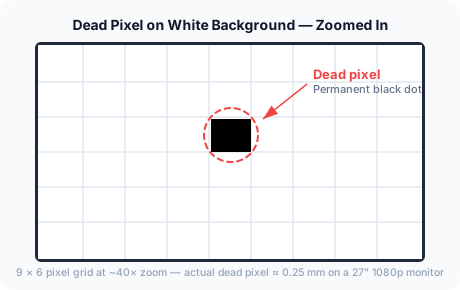
On most displays, a dead pixel appears as a tiny permanent black dot — roughly the size of a pinpoint at normal viewing distance. On a 27-inch 1080p monitor, a single dead pixel measures about 0.25mm. Small, but clearly visible once you know where to look.
What Does a Dead Pixel Look Like?
The appearance depends on what color is being displayed behind it.
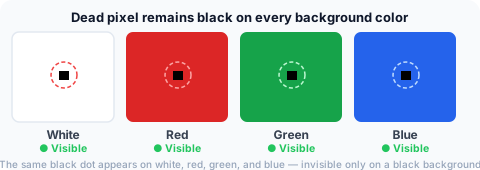
A dead pixel stays black on every background color — white, red, green, blue, gray. It only becomes invisible on a pure black background, because the dead pixel and the background are the same color.
This is why a complete dead pixel test cycles through multiple solid colors. Testing only on a dark background will miss dead pixels entirely.
On a Black Background — Completely Hidden
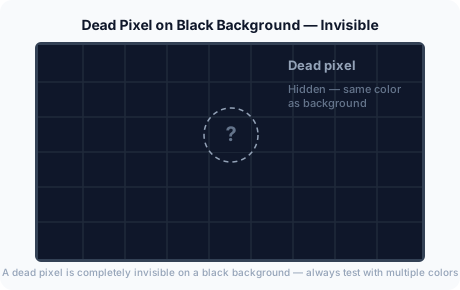
Running a black-only test is a common mistake. Always cycle through at least white, red, green, and blue to reliably detect a dead pixel.
Dead Pixel vs Stuck Pixel
These terms are often confused but describe different defects with different outcomes.
| Dead Pixel | Stuck Pixel | |
|---|---|---|
| Appearance | Always black | Fixed color — red, green, blue, or white |
| Visible on black background? | No | Yes |
| Cause | Transistor failure — pixel receives no power | Sub-pixel permanently powered on |
| Software fixable? | Rarely | Sometimes |
| Covered by warranty? | Usually yes | Usually yes |
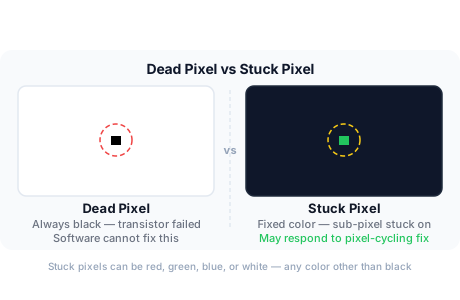
Dead pixel: No electrical signal reaches the pixel. It stays dark on every background color and cannot be turned on by any software method.
Stuck pixel: One or more sub-pixels are permanently in the on state. The result is a fixed colored dot — red, green, blue, or white — that is visible on dark backgrounds. Stuck pixels sometimes respond to pixel-cycling fix tools that rapidly flash the sub-pixels on and off. Try the dead pixel fix tool before concluding a pixel is truly dead.
What Causes Dead Pixels?
For a complete breakdown, see the dead pixel causes guide.
Is One Dead Pixel Normal?
Technically yes — within limits. The ISO 13406-2 standard classifies displays into three tiers:
- Class I: Zero defective pixels permitted. Used by premium professional monitors (Dell UltraSharp, EIZO).
- Class II: Up to 2 always-bright and 2 always-dark defects acceptable. The most common tier for consumer monitors.
- Class III: Up to 5 bright and 15 dark defects acceptable. Budget panels.
Most consumer monitors are Class II. A single dead pixel in the corner may fall within the manufacturer's acceptable tolerance and not automatically qualify for warranty replacement. See the dead pixel warranty guide for brand-specific policies.
Is It a Dead Pixel or Just Dust?
Before concluding that a pixel has died, rule out dust or debris on the screen:
Signs it is dust: The dot has irregular edges, appears slightly fuzzy, or moves when wiped. Dust sits on the surface of the glass.
Signs it is a pixel defect: The dot stays in exactly the same position across every background color, has clean square edges matching the pixel grid, and cannot be removed by cleaning.
Frequently Asked Questions
What is a dead pixel in simple terms?
A dead pixel is a tiny broken dot on your screen that does not light up. It appears as a permanent black point that stays the same no matter what is displayed.
Is a dead pixel permanent?
True dead pixels almost never recover. Unlike stuck pixels — which sometimes respond to pixel-cycling software — dead pixels involve transistor failure that no software can reverse.
Can dead pixels be fixed?
Dead pixels caused by transistor failure are almost never fixable without replacing the panel. Stuck pixels, which show as a colored dot rather than black, sometimes respond to pixel-cycling tools. If your defect shows any color (red, green, blue, white), try the dead pixel fix tool before pursuing a warranty claim.
Is a dead pixel the same as a broken pixel?
Yes. "Broken pixel" is an informal term for the same hardware defect. "Dead pixel" is the term used in most warranty documentation.
Can dust look like a dead pixel?
Yes. A small speck of dust closely resembles a dead pixel at normal viewing distance. The distinction: dust is on the screen surface and can be wiped away; a dead pixel is inside the panel and is completely unaffected by cleaning.
What is a dead pixel vs a stuck pixel?
A dead pixel is always black — its transistor has failed and it receives no power. A stuck pixel is always a fixed color (red, green, blue, or white) because one or more sub-pixels are permanently powered on. Dead pixels are rarely fixable; stuck pixels sometimes respond to pixel-cycling software.